AI image editor
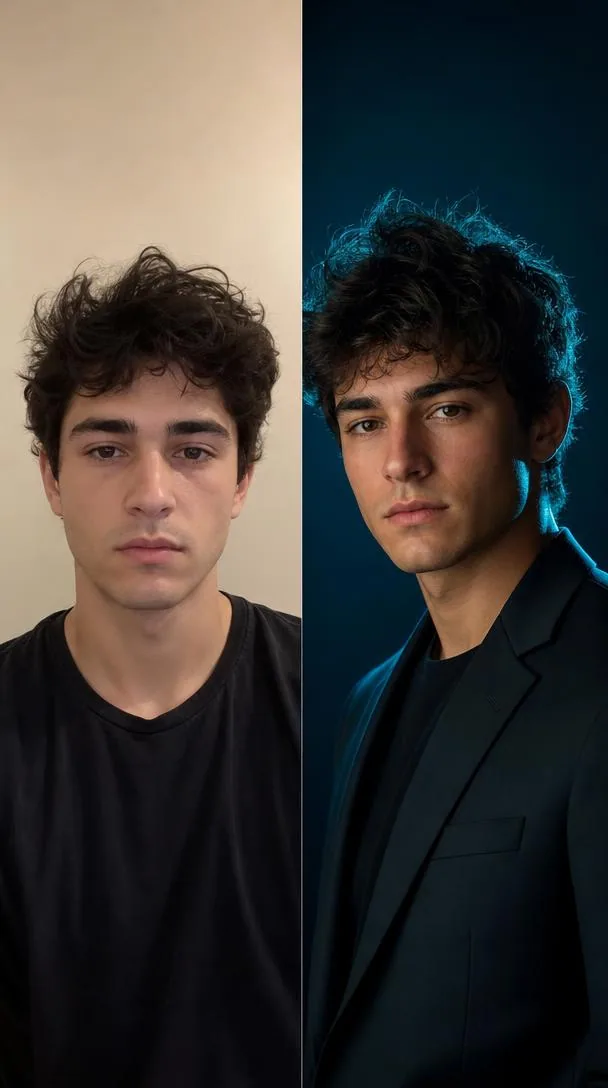
Keep the photo you have and change the part that is not working. Relight a flat portrait, move it into a different room, clean up a product shot, or restyle the wardrobe without opening a layered editor. The subject stays recognizable; the scene changes.
Sign in to use this tool
One email code, no password. A new account includes one free video and five free images per day.
Your result
How it works
- Write a specific scene, not a list of adjectives.
- Press generate and keep the page open.
- Download the image and reuse it anywhere.
Uploads are sent to the model provider only to produce this result. Do not upload anyone without their permission.
What this editor changes, and what it keeps
An AI edit is a directed transformation of an existing image, not a filter. You upload a photo and describe the result: "replace the background with a warm concrete studio", "change the light to a single softbox from the left", "put him in a black tailored jacket". The model keeps the person, pose, and expression, then rebuilds the parts you named.
The edits that work best are the ones a retoucher would do on a single layer: light, background, wardrobe, color grade, cleanup, and compositing a subject into a new scene. Extreme changes, such as a different face or a different body, are both harder and riskier; the page is not built for that.
Five edits people ask for most
These cover most of the real requests the tool receives. Keep the instruction short and name only one change per pass; if you stack five edits into one sentence, the model has to choose which one to honor.
- Relight a phone photo with soft studio light and a clean background.
- Replace a cluttered room with a plain wall, a curtain, or a gradient.
- Put a product on a plinth with a hard shadow for a marketplace listing.
- Restyle casual clothes into a blazer, a dress, or a seasonal costume.
- Clean up small distractions: a cable, a bin, a coffee cup, a passer-by.
How to keep a face recognizable
Say explicitly what must not change. "Keep the same face, skin tone, and expression" is a useful sentence, and it is more effective than hoping the model infers it. Upload a sharp, front-facing photo with even light; a dark, tilted, or motion-blurred source gives the model less identity to preserve.
If the first pass drifts, reduce the scope. Ask for the light change first, then the background in a second pass. Two small edits usually look more believable than one large one.
Product and thumbnail workflows
For a product photo, shoot the object against any plain surface and describe the set you want: "a matte ceramic mug on a travertine plinth, hard afternoon sun, sharp shadow, warm beige background, commercial product photography". The model is good at materials and shadows, which is most of what makes a product image look expensive.
For a thumbnail, edit the subject first and add the headline afterwards in a normal design tool. Generated text is unreliable; a clean portrait with empty space at the top is a better starting point than a poster with misspelled words.
What not to upload
Only upload photos you have the right to edit, and only of people who have agreed to it. Do not upload identity documents, screenshots of private messages, medical images, or photos of children from someone else. The provider screens inputs, but the responsibility for consent stays with the person pressing upload.
Edits are stored as a job record with a result URL. Do not put private information in the instruction field.
Frequently asked questions
What is the difference between the image editor and the image generator?
The generator starts from a written description and creates a new scene. The editor starts from your photo and changes a named part of it. If the person and pose matter, use the editor; if you are inventing the whole frame, use the generator.
Will the edit keep the person looking like themselves?
That is the goal, and it is why the page asks for a sharp, front-facing source and a clear instruction such as "keep the same face and expression". Large changes to pose or age are where likeness drifts most.
Can I edit a product photo for a marketplace?
Yes. A clean plinth, a hard shadow, and a neutral background are the three changes that most often make a listing look professional. Keep the product label readable and do not invent features the product does not have.
How many edits can I make for free?
A signed-in account gets a small number of free edits per day. The limit is shared with the image generator so the provider budget stays predictable.
Does the editor add a watermark?
No. The edited image is returned clean. Video renders are separate and use video credits.
Can I edit a photo of a friend?
Only with their permission. Do not use the editor to make someone appear in a place they were not, to change what they are wearing in a compromising way, or to create a misleading image of a real person.
Make your own version
Keep the photo you have and change the part that is not working. Relight a flat portrait, move it into a different room, clean up a product shot, or restyle the wardrobe without opening a layered editor. The subject stays recognizable; the scene changes.