AI Halloween video generator
Halloween 2026 is a costume search first and a video second. Take the look you are already considering, put two faces into a haunted studio, and post the clip before the party. Upload two photos, pick the Halloween scene, and describe the costume idea.
Sign in to use this tool
One email code, no password. A new account includes one free video and five free images per day.
Your result
How it works
- Upload two front-facing photos.
- Pick a studio look and add a short topic.
- Download the vertical MP4.
Uploads are sent to the model provider only to produce this result. Do not upload anyone without their permission.
Halloween 2026: from costume search to a video
Every October, costume searches spike before the parties do. The 2026 trend list is full of characters, creatures, and group ideas, but most of those searches are still answered with a shopping link or a still image. A short video is a better answer: it shows the look on a real person, in motion, before anyone buys anything.
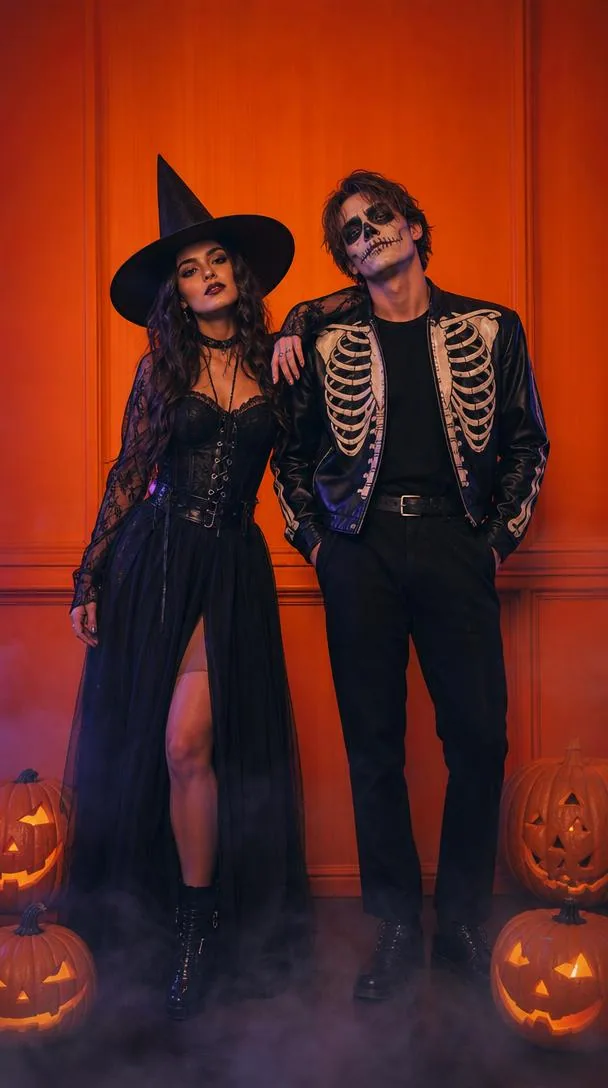
This page is the bridge. You describe the costume you want to try, and the model puts the two people in a studio set with pumpkin light, drifting fog, and a vertical frame. It is a preview, a party invite, and a post in one file.
The 2026 trend list, translated into video ideas
The useful part of a trend list is not the exact character; it is the visual idea underneath. A haunted unicorn mascot becomes a glowing horn and a tattered cape. A cosmic princess becomes a star-pattern gown and a moon crown. A skeleton jacket becomes a black-and-white bone print under orange light. These are original looks inspired by the trend, not copies of a film character.
- Haunted unicorn: white plush hood, spiraled horn, violet glow, fog.
- Cosmic princess: midnight-blue gown, silver embroidery, star crown.
- Glow-in-the-dark dinosaur: a pet or a person in a neon-green dino suit.
- Skeleton glam: bone print, smoky eye, orange rim light.
- Cowboys and angels: two people, one hat and one halo, shared frame.
- Backrooms wanderer: yellow wallpaper, fluorescent hum, a slow camera push.
How to make a Halloween clip in three steps
Upload one front-facing photo per person. Choose the orange COLORS booth, which is the warmest set for pumpkin light. Add a topic that names the costume and the mood, then render. The clip arrives as a vertical MP4 that can go straight to TikTok, Reels, or a group chat.
If you only have one person, use the photo-to-video page instead and describe the costume in the prompt.
Photo tips for costumes
A costume photo is harder than a plain portrait because hats, masks, and props can hide the face. For the best result, upload a photo where the face is still visible: a hood pushed back, a mask held to the side, or a makeup look without a full face covering. The model needs the face to keep the person recognizable.
If the costume is the point and the face is hidden, the result will look more like a generic character than like your friend. That can be fine for a mood clip, but it is not a portrait.
Prompt ideas for a haunted studio
The topic field accepts a short scene description. These are written to keep the motion simple, which is what makes a Halloween clip look intentional rather than chaotic.
- "Two friends in haunted-unicorn hoods, violet fog, slow head turn, pumpkin light."
- "A cosmic princess and a skeleton, silver and bone costumes, camera slowly pushes in."
- "Two cowboys with one angel halo, warm orange booth, dust in the air, subtle sway."
- "A glowing dinosaur and a witch, neon green and purple, fog rolling across the floor."
A note on costumes, likeness, and consent
Costume ideas are not licenses. Do not reproduce a copyrighted character exactly, and do not use a real person's face to imply they endorse a costume, a product, or a party. If the photo is of a friend, ask before you upload it. If the photo is of a child, only upload it with a parent or guardian's permission.
The site screens inputs and the provider applies its own safety checks, but consent is still the uploader's responsibility.
Frequently asked questions
Is this a Halloween costume generator or a video generator?
It generates a short video of people in a Halloween scene. You describe the costume and the mood; the model builds the performance. For a still image of a costume idea, use the AI image generator first.
Can I use a real movie character?
Do not ask for an exact copyrighted character. Describe the visual idea instead: a haunted unicorn mascot, a cosmic princess, a skeleton glam look. Original looks are safer and usually render better.
How many people can be in the clip?
Two. The page takes two photos, one per person, because the reference-to-video model preserves two identities most reliably. For a group costume, make a series of two-person clips.
Can I make a Halloween clip for my pet?
Yes. Use the pet video page with two pet photos, or the photo-to-video page with one. A glow-in-the-dark dinosaur costume is a popular direction.
Will the clip be ready before Halloween?
A render usually takes three to six minutes. The page is live now, and the tool does not depend on a seasonal queue, so you can make a clip today and post it the same evening.
Does it cost extra for Halloween?
No. Halloween is a scene preset, not a separate product. A new account includes one free video; after that, one credit renders one video.
Make your own version
Halloween 2026 is a costume search first and a video second. Take the look you are already considering, put two faces into a haunted studio, and post the clip before the party. Upload two photos, pick the Halloween scene, and describe the costume idea.